
The following nodes can only be used in combination with a VIU2.
ONNX Code Detection
This component allows you to detect and read codes in a neural network using AI methods. Configure the basic settings and use the Get node of this component in combination with the "Detect Code (ONNX)" node.
Parameter set
|
Attribute |
Type |
Description |
|---|---|---|
|
Model File Path |
FileStoreItem |
Defines the path to the ONNX model to be used for inference. |
|
Border Color Grayscale Value |
Int32 |
|
|
Auto Padding |
Boolean |
Defines whether spacing should be set automatically. |
|
Keep Aspect Ratio |
Boolean |
Defines whether the aspect ratio should be maintained. |
|
Scale Up Enabled |
Boolean |
Defines whether enlargement should be allowed. |
|
Stride |
Int32 |
|
|
Number Of Threads |
Int32 |
Defines the number of threads to be used for inference. |
|
Character Classes File Path |
FileStoreItem |
|
|
Confidence Threshold |
Single |
Defines the minimum confidence level an object must have to be considered recognized. The value must be between 0 and 1. |
|
Iou Threshold |
Single |
Defines the maximum IoU value between two detected objects. If the threshold is exceeded, the objects are counted as one. The value must be between 0 and 1. |
|
Maximal Width And Height |
Int32 |
Defines the maximum value for height and width. |
|
Maximal Number Of Boxes |
Int32 |
Defines the maximum number of boxes. |
|
Maximal Number Of Detections |
Int32 |
Defines the maximum number of returned detections. |
|
Minimal Code Length |
Int32 |
Defines the minimum code length of the returned detections. |
|
R |
Byte |
|
|
G |
Byte |
|
|
B |
Byte |
|
|
Character Roi Thickness |
Int32 |
|
ONNX Yolo Classification
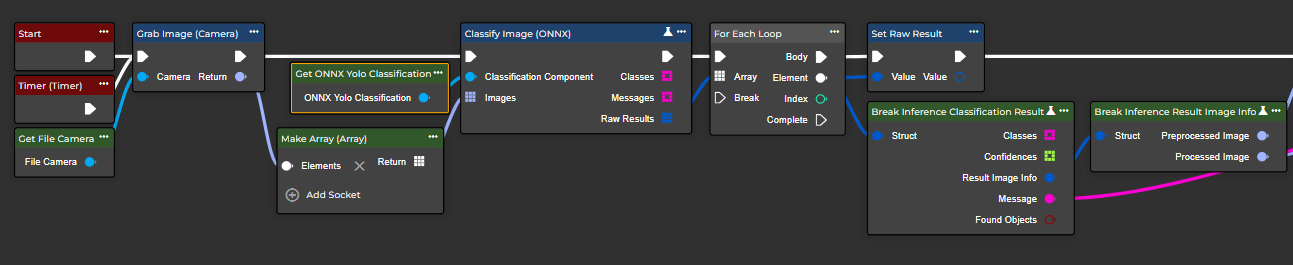
This component allows you to classify images using AI methods. Configure the basic settings and use the Get node of this component in combination with the "Classify Image (ONNX)" node.
Flow
Parameter set
|
Attribute |
Type |
Description |
|---|---|---|
|
Model File Path |
FileStoreItem |
Defines the path to the ONNX model to be used for inference. |
|
Number Of Threads |
Int32 |
Defines the number of threads to be used for inference. |
|
Confidence Threshold |
Single |
Defines the minimum confidence level an object must have to be considered recognized. The value must be between 0 and 1. |
|
Maximal Number Of Detections |
Int32 |
Defines the maximum number of returned detections. |
ONNX Yolo Detection
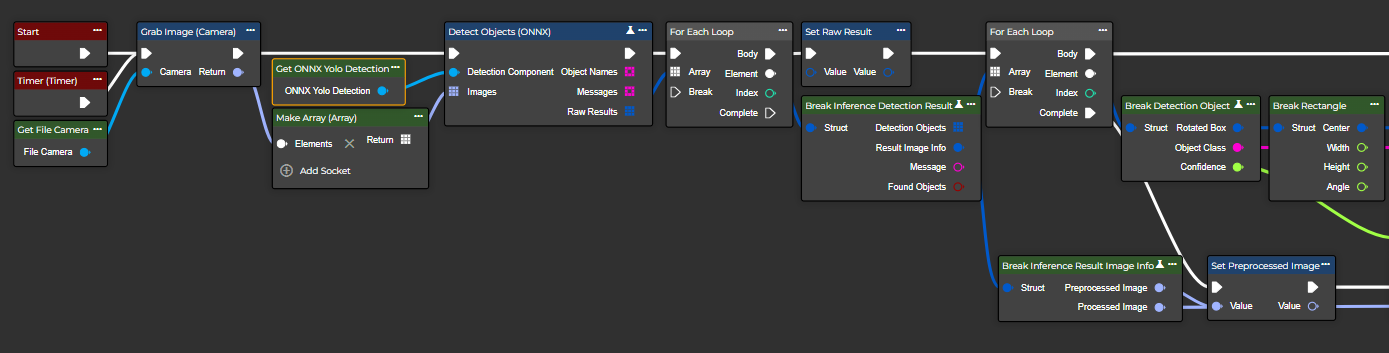
This component allows you to detect objects in an image using AI methods. Configure the basic settings and use the Get node of this component in combination with the “Detect Objects (ONNX)” node.
Flow
Parameter set
|
Attribute |
Type |
Description |
|---|---|---|
|
Model File Path |
FileStoreItem |
Defines the path to the ONNX model to be used for inference. |
|
Number Of Threads |
Int32 |
Defines the number of threads to be used for inference. |
|
Oriented Boxes |
Boolean |
Defines whether object recognition is performed in a normal or oriented manner. |
|
Confidence Threshold |
Single |
Defines the minimum confidence level an object must have to be considered recognized. The value must be between 0 and 1. |
|
Iou Threshold |
Single |
Defines the maximum IoU value between two detected objects. If the threshold is exceeded, the objects are counted as one. The value must be between 0 and 1. |
|
Maximal Number Of Detections |
Int32 |
Defines the maximum number of returned detections. |
|
Draw Object Name |
Boolean |
Defines whether the object name should be displayed in the processed image. |
|
Draw Object Score |
Boolean |
Determines whether the confidence score should be displayed in the processed image. |
|
Bounding Box Thickness |
Int32 |
Sets the strength of the bounding boxes in the processed image. The value must be greater than 0. |
|
Object Name Thickness |
Int32 |
Sets the strength of the bounding box label. The value must be greater than 0. |
|
Object Name Font Size |
Single |
Sets the text size of the bounding box label. |
ONNX Yolo Segmentation
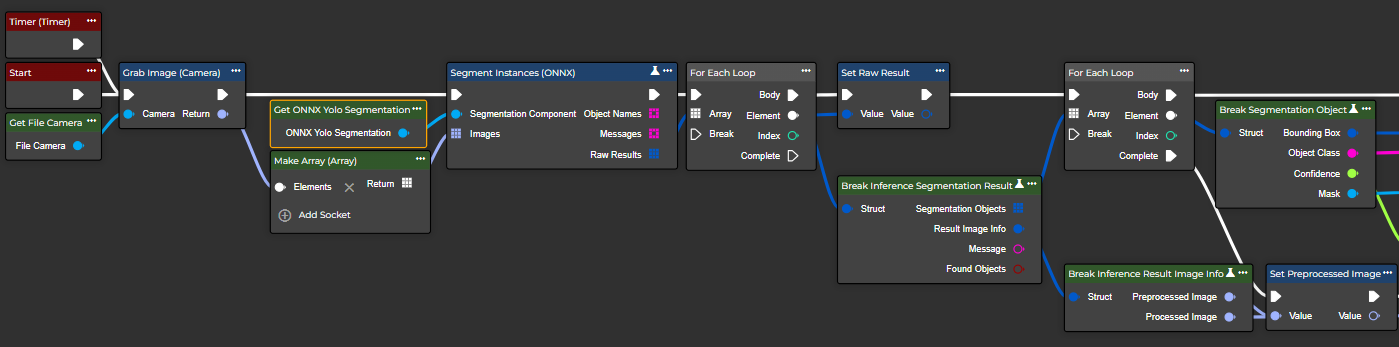
This component allows you to perform instance segmentation using AI methods. Configure the basic settings and use the Get node of this component in combination with the "Segment Instances (ONNX)" node.
Flow
Parameter set
|
Attribute |
Type |
Description |
|---|---|---|
|
Model File Path |
FileStoreItem |
Defines the path to the ONNX model to be used for inference. |
|
Number Of Threads |
Int32 |
Defines the number of threads to be used for inference. |
|
Confidence Threshold |
Single |
Defines the minimum confidence level an object must have to be considered recognized. The value must be between 0 and 1. |
|
Mask Threshold |
Single |
Defines the threshold that determines whether a pixel is part of the object mask or not. The value must be between 0 and 1. |
|
Iou Threshold |
Single |
Defines the maximum IoU value between two detected objects. If the threshold is exceeded, the objects are counted as one. The value must be between 0 and 1. |
|
Maximal Number Of Detections |
Int32 |
Defines the maximum number of returned detections. |
|
Draw Object Name |
Boolean |
Determines whether the object name should be displayed in the processed image. |
|
Draw Object Score |
Boolean |
Determines whether the confidence score should be displayed in the processed image. |
|
Bounding Box Thickness |
Int32 |
Sets the strength of the bounding boxes in the processed image. The value must be greater than 0. |
|
Object Name Thickness |
Int32 |
Sets the strength of the bounding box label. The value must be greater than 0. |
|
Object Name Font Size |
Single |
Sets the text size of the bounding box label. |