
Introduction
The workflow has several components that can be used to control hardware components or read existing information. Simple use cases with the hardware components will be simulated using examples, and the configuration options will be explained in more detail.
Digital Write
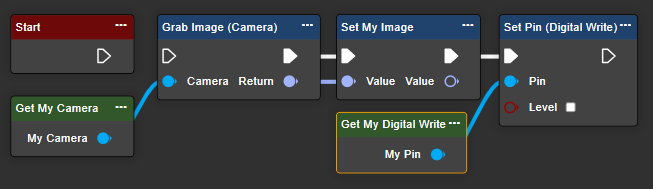
Set an output pin of the evoVIU to a digital HIGH or LOW signal. You can control either PIN2 or PIN4.
|
Parameter |
Type |
Description |
Example |
|---|---|---|---|
|
Pin |
Int32 |
Specify which output pin you want to control. |
Possible values:
|
Further information about the Digital Write component can be found here.
Eight Bit Lens
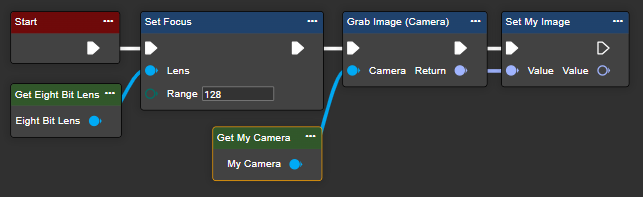
The 8-bit liquid lens driver allows you to control the focus of a VIUXXX-XX[0...4]-X-X S-mount camera in 255 steps. This requires the "Set Focus" node in the workflow, to which the component can be connected. The component itself has no settings; these are located in the "Set Focus" node.
Settings:
-
0: Lens driver is switched off
-
1 – 254: Lens tension adjustment
Note: The lens voltage can be calculated using Vout = 9.8 V + (setting * 205 mV).
Gpio Trigger
The GPIO trigger is activated as the start event of the workflow as soon as the expected signal is received from the GPIO pins connected to the evoVIU.
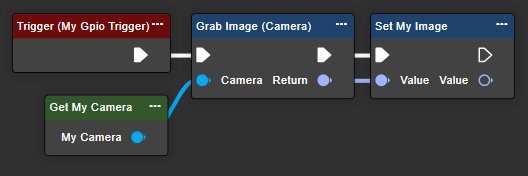
Verwenden Sie den Ereignisknoten „Trigger (Gpio Trigger Component)“, um auf die angegebenen GPIO-Pins zu reagieren. Bei Auslösung werden alle verbundenen Knoten ausgeführt.
|
Attribute |
Type |
Description |
Example |
|---|---|---|---|
|
Delay |
Int32 |
"Delay" sets an optional delay between signal detection and event creation. |
50 |
|
Debounce Time |
Int32 |
The "Debounce time" setting allows you to define a period after receiving a trigger signal during which new trigger signals are ignored. This setting helps prevent multiple responses to bouncing/noisy electrical signals. |
100 |
|
Edge |
Enum |
The "Edge" setting determines whether a response is given to a rising or falling edge of the signal. |
Possible values:
|
Further information about the GPIO trigger component can be found here.
Loxi Light
The Loxi Light component allows the configuration of individual LED segments (though not visually as shown in the image). Each segment can be assigned specific values.
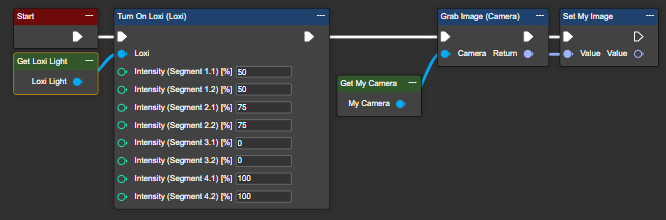
The Get node of the Loxi Light component allows you to configure, for example, the activation of the light. In addition to the light intensity, the "Turn On Loxi (Loxi)" node also requires an instance of the Loxi Light component. The component itself has no specific settings.