
Hardware events serve as the interface between VISIONWEB and the physical environment. They respond to incoming signals from sensors, switches, or digital inputs and outputs, making external events immediately usable. Typical use cases include starting a flow through an external trigger such as a light barrier pulse or responding to a signal from a PLC. This direct connection to the hardware allows processes to be precisely controlled and integrated into existing plant environments. Hardware events are therefore an essential element for using VISIONWEB reactively and at machine level.
GPIO Trigger
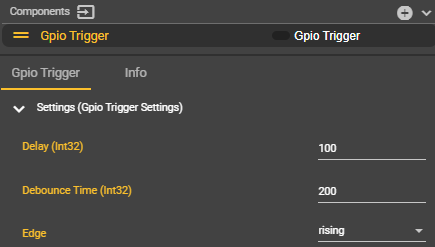
The GPIO trigger is created as usual under Components using the "+" symbol. It can then be selected from the Event Graph context menu and connected to the desired flow. During creation, the following parameters can be defined in the settings:
-
Delay Time: Defines a delay between the physical input signal and the actual triggering of the event. This allows the trigger to be set later.
-
Debounce Time: Specifies how long after an input signal no new trigger is accepted. This delay prevents multiple triggering due to bouncing switches or interference.
-
Signal Edge: Determines the edge at which the trigger becomes active:
-
Rising: Rising edge (GND → 24 V)
-
Falling: Falling edge (24 V → GND)
-
The current GPIO trigger is referenced to pin 5 of the evoVIU camera on the 5-pin M12-A coded connector with respect to ground. This allows external systems to reliably transmit a signal to the camera that directly triggers a workflow.
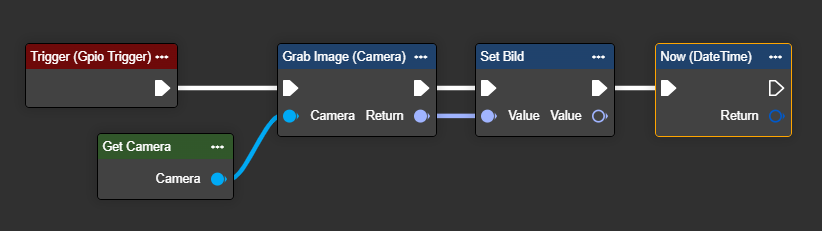
In the example shown, the flow reacts to a signal with a rising edge (GND → 24 V). After the signal is applied, the flow initially waits approximately 100 ms (delay time) before actually triggering the event.
If another signal arrives within 200 ms (debounce time), it is ignored. New triggers can only be considered after the debounce time has elapsed.
The values for delay and debounce are adjustable in milliseconds and can be set to any desired value. This allows the debounce time to be defined over several seconds or even minutes to reliably suppress unwanted "flickering" or bouncing of the sensor.
Please note: If multiple different events are used in the system, setting a delay on the hardware trigger can cause other events to overtake the delayed trigger in the event queue – even if the physical signal was present earlier. This is due to the sequential processing and the delayed release of the event.