
Custom Bookmarks
The Get Bookmark and Update Bookmark nodes only function in combination with the Bookmark component. To use them, please create a Bookmark component and select the bookmark you wish to use for further editing from the dropdown menu in the Details tab of the associated component.
Get Bookmark
This node allows you to query and read the currently available information for a bookmark.
Flow
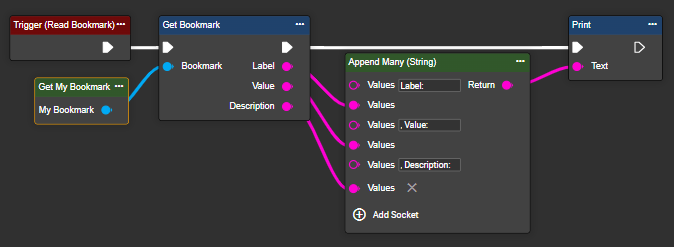
Parameter set
|
Attribute |
Type |
Description |
|---|---|---|
|
Bookmark |
Bookmark |
Requires the Get node of a Bookmark component. |
|
Label |
String |
|
|
Value |
String |
|
|
Description |
String |
Update Bookmark
This node allows the currently available information for a bookmark to be overwritten or modified as desired.
Flow
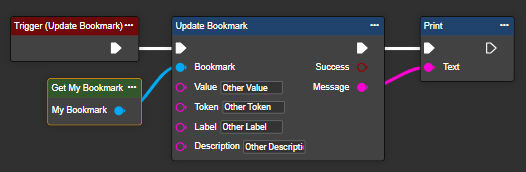
Parameter set
|
Attribute |
Type |
Description |
|---|---|---|
|
Bookmark |
Bookmark |
Requires the Get node of a Bookmark component. |
|
Label |
String |
|
|
Token |
String |
|
|
Value |
String |
|
|
Description |
String |
|
|
Success |
Boolean |
Indicates whether the update was successful or not. |
|
Message |
String |
Returns the success or error message of the update process, if applicable. |
Default Bookmarks
In the workflow, you can also use fixed, unchangeable bookmarks that contain system information. You receive the value as text output from the node, which you can then use for further processing. The following values are available for this purpose:
|
Bookmark |
Description |
Example |
|---|---|---|
|
Camera Bookmark |
Camera type of the device. |
IMX183C |
|
Device Name Bookmark |
Name of the device. |
evoVIU Smartcam |
|
Display Bookmark |
Display type of the device. |
UOLED-96-G2 |
|
Docker Bookmark |
Docker type of the device. |
B |
|
Focus Bookmark |
Focus type of the device.. |
HV892 |
|
IP Address Bookmark |
Network address of the camera. |
10.30.100.8 |
|
Lens Bookmark |
Lens type of the device. |
C-Mount |
|
Light Bookmark |
Light type of the device. |
None |
|
MAC Address Bookmark |
MAC address of the camera. |
F8:DC:7A:D4:75:10 |
|
Sensor Code Bookmark |
Sensor Code of the device. |
|
|
Serial Number Bookmark |
Identifier of the camera. |
201001 |
|
Wireless Bookmark |
Wireless network type of the device. |
Wifi |
No additional component is required to use a default bookmark.