
With VISIONWEB, users have the option of storing data on FTP and SFTP servers.
Connection Paramter
|
Parameter |
Type |
Unit |
Explanation |
Example |
|---|---|---|---|---|
|
Address |
Domain || IP - String |
|
Destination address of the (S)FTP server |
myftp.myfactory.de
|
|
Port |
Integer |
|
Port to the (S)FTP-Server |
FTP: Port 21
|
|
Username |
String |
|
Username for authentication |
yourName |
|
Password |
String |
|
Password for authentication |
xxxxxxxxx |
|
Timeout |
Integer |
ms |
Timeout if transmission takes too long |
5000 |
Additional parameters
|
Parameter |
Type |
Unit |
Explanation |
Example |
|---|---|---|---|---|
|
Payload |
Byte Array |
|
Payload - Anything that can be converted into bytes |
Files |
|
Directory |
String |
|
File path to the desired endpoint. This attribute is optional. |
/Directory1/Directory2/ |
|
Filename |
String |
|
Data name Please always include the file extension. |
myImage.jpg
|
Workflow Setup
Creating an FTP connection
Unlike SFTP, the FTP node is not created as a component. It will only establish a connection at the time of the workflow—when the iteration reaches that point. Therefore, no component needs to be created.
To use FTP, the following steps must be performed.
-
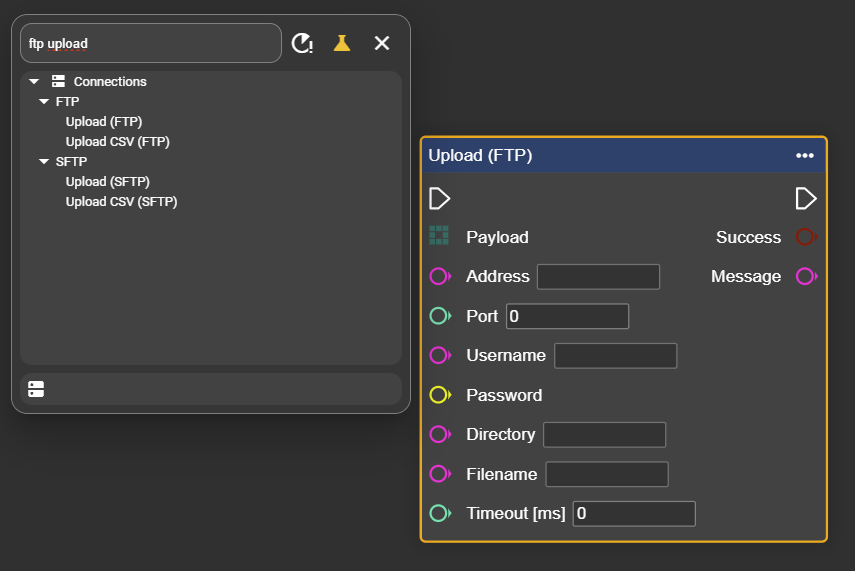
In the context menu, look for the “Upload (FTP)” node - there is a separate node for CSV applications.
-
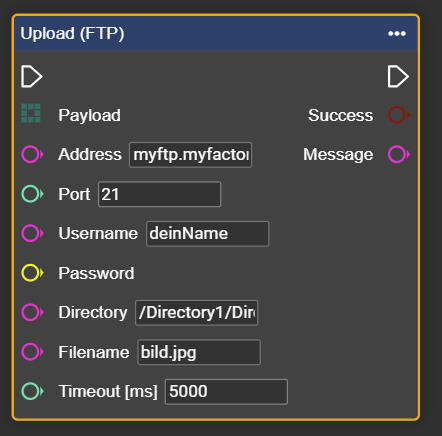
Now fill the Upload (FTP) node with the connection parameters.
-
Attach the data you want to transmit – in this example, an image – to the payload.
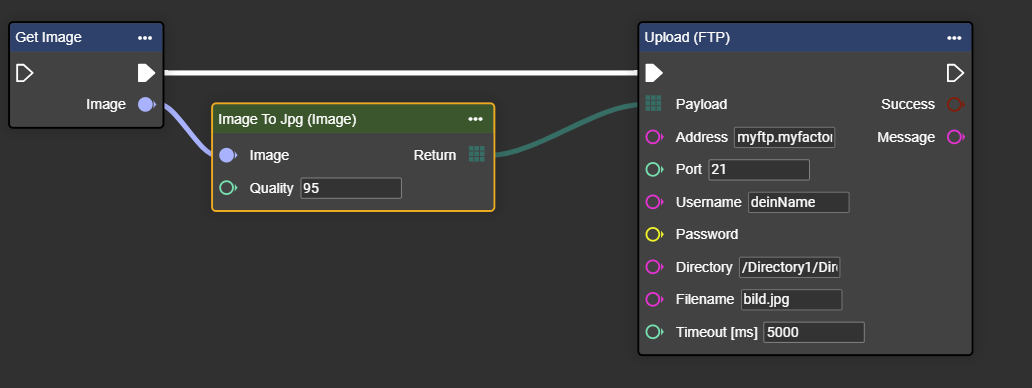
Congratulations! You can now upload data to the FTP server.
-
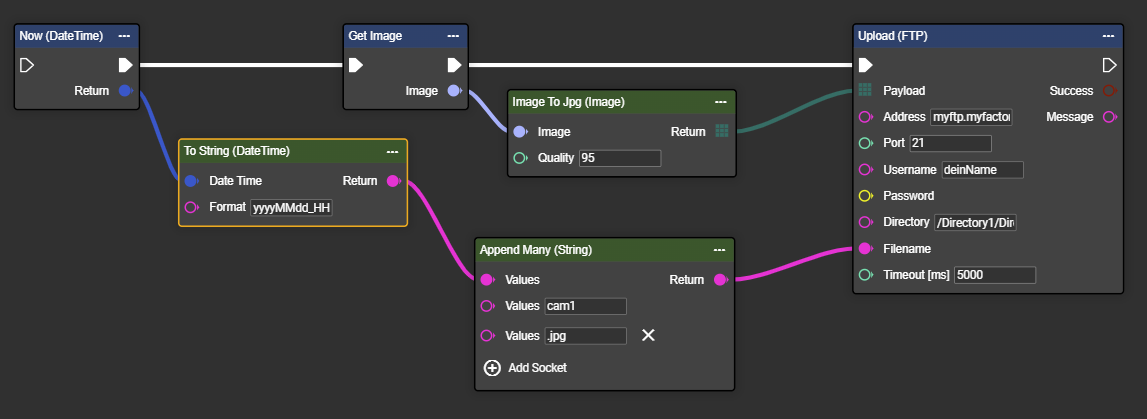
The filename can be generated dynamically in the next step, for example using “Append” and the current time. This way, the file
20250731_145234_cam1.jpgwill be saved inDirectory1/Directory2.
-
Folders and filenames can also be defined dynamically depending on the result. In the example, the “Result” controls not only the folder but also the input for the filename.
Result = iO: Stored in directory iO with filename 20250731_145234_cam2_iO.jpg
Result = niO: Stored in directory niO with filename 20250731_145234_cam2_niO.jpg
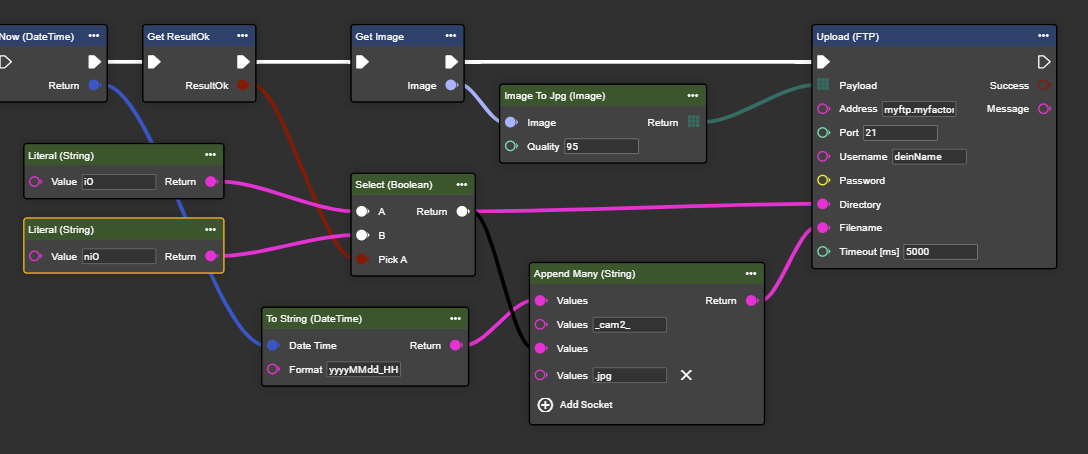
Congratulations! You can now dynamically adjust filenames and store them in different folders depending on the situation.
-
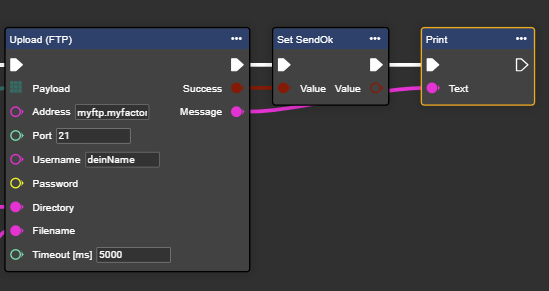
Via the “Success” and “Message” outputs, you can retrieve information about each iteration of the data transmission process.
Creating an SFTP Connection
This type of FTP transfer is usually preferred by most customers.
-
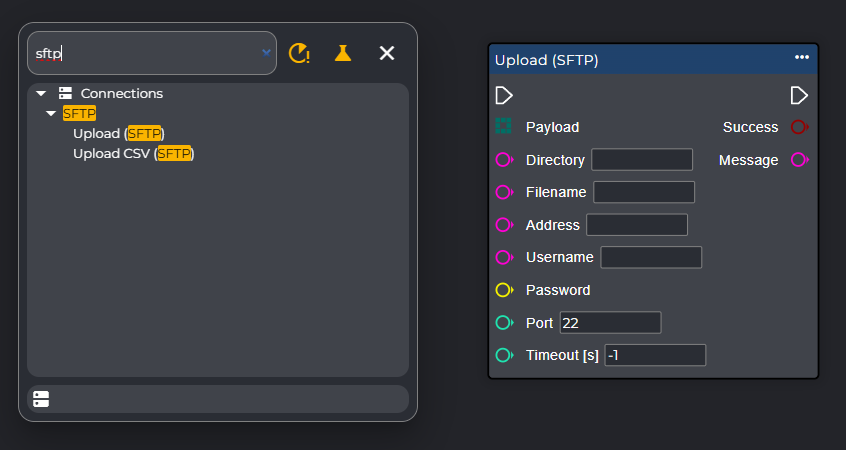
In the workflow's context menu, also search for and select the "Upload (SFTP)" node.
-
Now fill the upload (SFTP) node with the connection parameters.
-
You can then embed the node in your workflow, similar to how you would with FTP (https://evopro.atlassian.net/wiki/spaces/DVIU/pages/395542898/8.1.0-en+FTP+SFTP#Anlegen-einer-FTP-Verbindung).
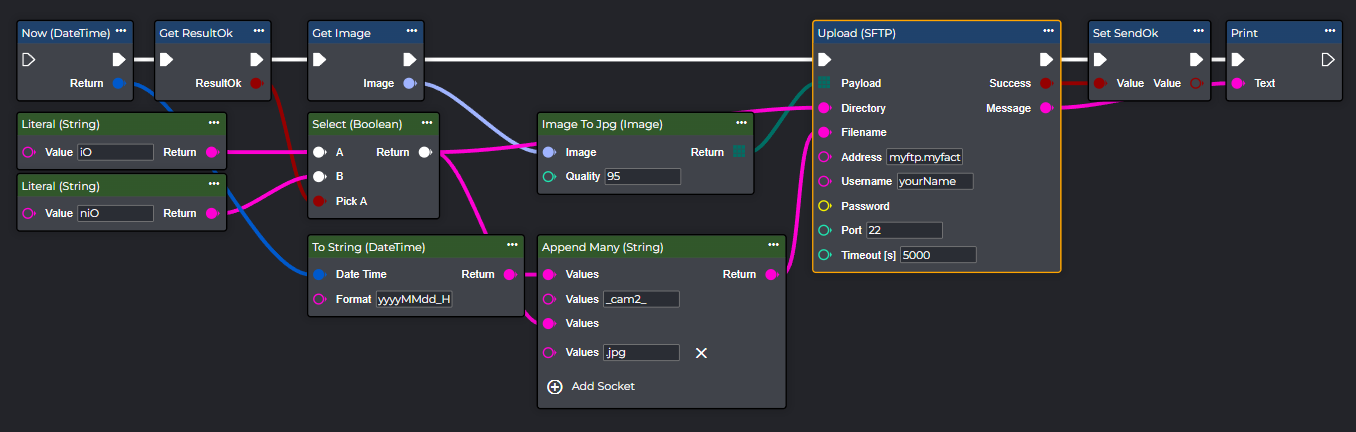
Congratulations! You can now also use the SFTP node dynamically.
Upload File (FTP)
Instead of a byte array, you can also directly access files from the camera's file system and upload them.
Sends an FTP datagram to a remote host. The File Transfer Protocol (FTP) is a standard network protocol for transferring files between computers on a network.
Important:
Direct access to an FTP server from a production network may not be possible immediately, as this requires special access rights that need to be configured by your system administrator.
Flow
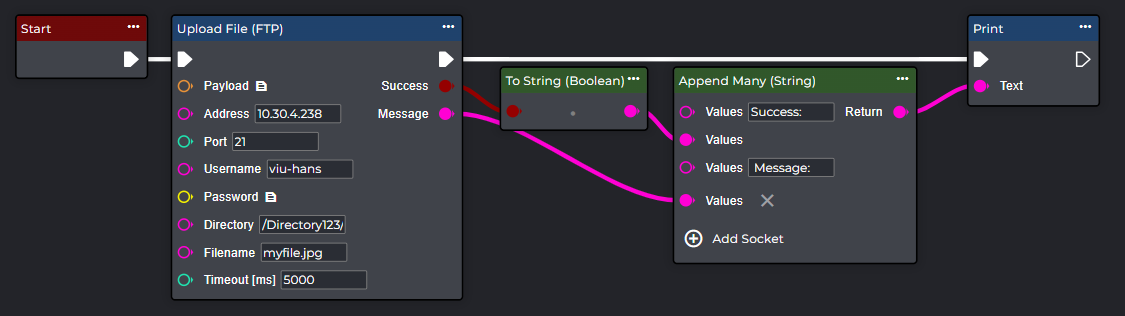
Parameter set
|
Parameter |
Type |
Unit |
Description |
Example |
|---|---|---|---|---|
|
Payload |
File Store Item |
|
A file that specifies the FTP datagram you want to send. |
|
|
Address |
Domain || IP - String |
|
Target address of the FTP server. |
myftp.myfactory.de
|
|
Port |
Integer |
|
Port to FTP server. |
FTP: Port 21 |
|
Username |
String |
|
Username for authentication. |
yourName |
|
Password |
String |
|
Password for authentication |
xxxxxxxxx |
|
Directory |
String |
|
The directory where the file is saved. |
MyDirectory |
|
Filename |
String |
|
The filename that the uploaded data should receive. |
my-file |
|
Timeout |
Integer |
ms |
Timeout due to excessively long transmission |
5000 |
Upload File (SFTP)
Instead of a byte array, you can also directly access files from the camera's file system and upload them.
Sends an SFTP datagram to a remote host. Secure File Transfer Protocol (SFTP) is a standard network protocol for secure, encrypted file transfer between computers.
Important:
This node requires an SFTP instance. You can create a "Send SFTP" node in the component area and add it to the workflow via "Retrieve Node".
Flow
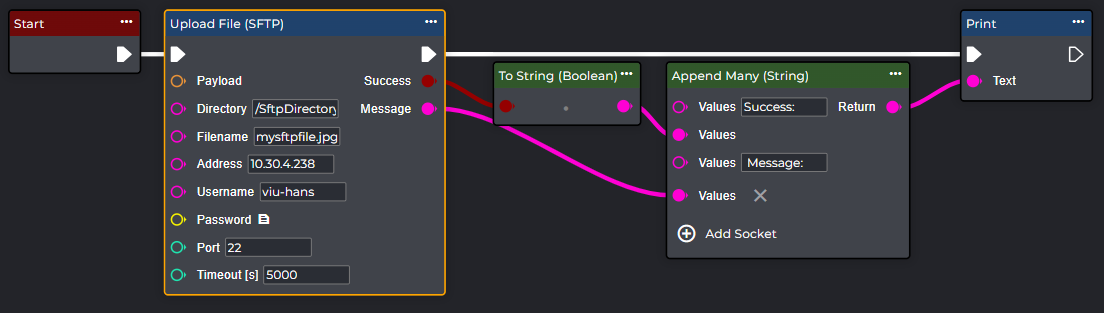
Parameter set
|
Parameter |
Type |
Unit |
Description |
Example |
|---|---|---|---|---|
|
Payload |
File Store Item |
|
A file that specifies the SFTP datagram you want to send. |
|
|
Address |
Domain || IP - String |
|
Target address of the SFTP server. |
myftp.myfactory.de
|
|
Port |
Integer |
|
Port to SFTP server. |
SFTP: Port 22 |
|
Username |
String |
|
Username for authentication, |
yourName |
|
Password |
String |
|
Password for authentication. |
xxxxxxxxx |
|
Directory |
String |
|
The directory where the file is saved. |
MyDirectory |
|
Filename |
String |
|
|
my-file |
|
Timeout |
Integer |
ms |
Timeout due to excessively long transmission |
5000 |