
Now (DateTime)
This node allows you to pass the current date and time along with a time offset. A time offset is the difference in hours and minutes between a specific time zone and Coordinated Universal Time (UTC).
Parameter set
|
Parameter |
Type |
Description |
|---|---|---|
|
Return |
DateTimeOffset |
Current date / current time. |
Utc Now (DateTime)
This node allows you to transmit the current date and time in UTC. UTC is a standardized, globally valid time format that serves as a reference point for time synchronization in different regions.
Parameter set
|
Parameter |
Type |
Description |
|---|---|---|
|
Return |
DateTimeOffset |
Current date / current time in UTC. |
Day (DateTime)
This node allows you to pass on the current day.
Parameter set
|
Parameter |
Type |
Description |
|---|---|---|
|
Date Time |
DateTimeOffset |
Current date / current time (from the Now or Utc Now node). |
|
Return |
Int32 |
Current day. |
Month (DateTime)
This node allows you to pass on the current month.
Parameterset
|
Parameter |
Typ |
Beschreibung |
|---|---|---|
|
Date Time |
DateTimeOffset |
Current date / current time (from the Now or Utc Now node). |
|
Return |
Int32 |
Current month. |
Year (DateTime)
This knot allows you to pass on the current year.
Parameter set
|
Parameter |
Type |
Description |
|---|---|---|
|
Date Time |
DateTimeOffset |
Current date / current time (from the Now or Utc Now node). |
|
Return |
Int32 |
Current year. |
Hour (DateTime)
This node allows you to pass on the current hour.
Parameterset
|
Parameter |
Type |
Description |
|---|---|---|
|
Date Time |
DateTimeOffset |
Current date / current time (from the Now or Utc Now node). |
|
Return |
Int32 |
Current hour. |
Minute (DateTime)
This node allows you to pass on the current minute.
Parameter set
|
Parameter |
Type |
Description |
|---|---|---|
|
Date Time |
DateTimeOffset |
Current date / current time (from the Now or Utc Now node). |
|
Return |
Int32 |
Current minute. |
Second (DateTime)
This node allows you to pass on the current second.
Parameter set
|
Parameter |
Type |
Description |
|---|---|---|
|
Date Time |
DateTimeOffset |
Current date / current time (from the Now or Utc Now node). |
|
Return |
Int32 |
Current second. |
Millisecond (DateTime)
This node allows you to pass on the current millisecond.
Parameter set
|
Parameter |
Type |
Description |
|---|---|---|
|
Date Time |
DateTimeOffset |
Current date / current time (from the Now or Utc Now node). |
|
Return |
Int32 |
Current millisecond. |
To Unix Time Seconds (DateTime)
This node allows you to convert the current date and time into Unix time. This corresponds to the number of seconds that have passed since January 1, 1970 (the Unix epoch).
Flow

Parameter set
|
Parameter |
Type |
Description |
|---|---|---|
|
Date Time |
DateTimeOffset |
Current date and time (from Node Now or UTC Now). |
|
Return |
Int32 |
Unix time in seconds. |
From Unix Time Seconds (DateTime)
This node allows you to convert Unix time to the current date and time. The entered value corresponds to the number of seconds that have passed since January 1, 1970 (the Unix epoch).
Flow

Parameter set
|
Parameter |
Type |
Description |
|---|---|---|
|
Seconds |
Int32 |
Unix time in seconds. |
|
Return |
DateTimeOffset |
Current date and time (from Node Now or UTC Now). |
To String (DateTime)
This node allows you to pass the current date and time as a string. This is useful if you want to pass the value to another node or display the date and time on the dashboard.
Parameter set
|
Parameter |
Type |
Description |
|---|---|---|
|
Text |
String |
This is a text-based date. |
|
Format |
String |
Here you can set the format for displaying the date and time. Use "HH" for the hour in 24-hour format (00–23) or "hh" for the hour in 12-hour format (01–12). When using "hh," "dd" is usually added to indicate AM/PM. Date and time: "yyyy-MM-dd HH:mm:ss", "dd/MM/yyyy HH:mm:ss" or "MMMM dd, yyyy HH:mm:ss" Date only: "yyyy-MM-dd", "dd/MM/yyyy" or "MMMM dd, yyyy" Time only: "HH:mm:ss" or "hh:mm dd" Custom combinations: "yyyy-MM-dd hh:mm dd" or "MMMM dd, yyyy 'at' HH:mm:ss |
|
Return |
String |
Outputs the string representation of the current date and time. |
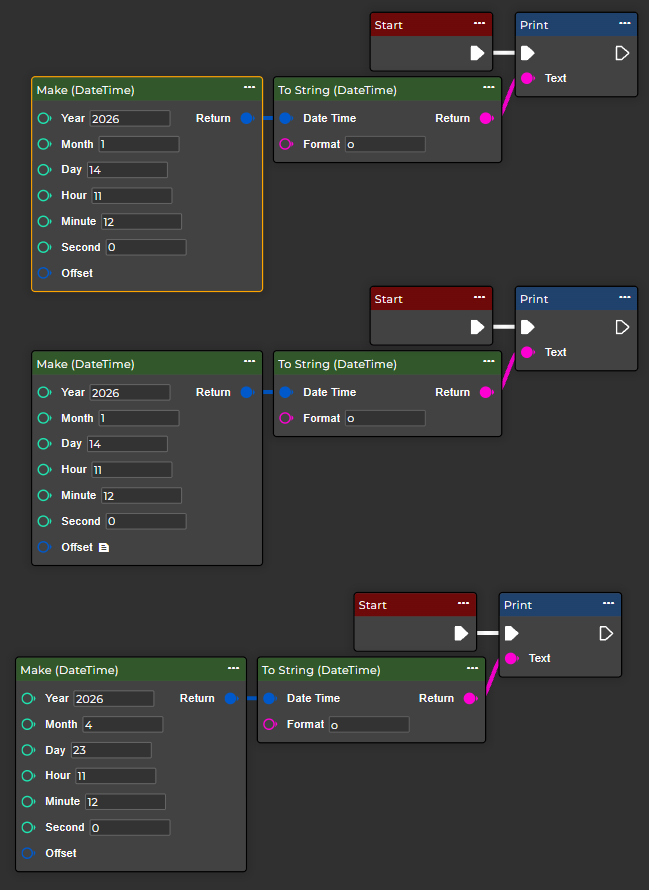
Make (DateTime)
This node allows you to create any date and time entries.
Note: The camera's time zone will be used if no offset is applied.
Flow
Parameter set
|
Parameter |
Type |
Description |
|---|---|---|
|
Year |
Int32 |
Represents the year. Valid values are between 0 and x. |
|
Month |
Int32 |
Represents the month. Valid values range from 1 to 12. |
|
Day |
Int32 |
Represents the day. Valid values range from 1 to 31. Note months with fewer days. |
|
Hour |
Int32 |
Represents the hour. Valid values range from 0 to 23. |
|
Minute |
Int32 |
Represents the minute. Valid values are between 0 and 59. |
|
Seconds |
Int32 |
Represents the second value. Valid values range from 0 to 59. |
|
Offset |
TimeSpan |
|
|
Return |
DateTimeOffset |
Current date and time (from Node Now or UTC Now). |
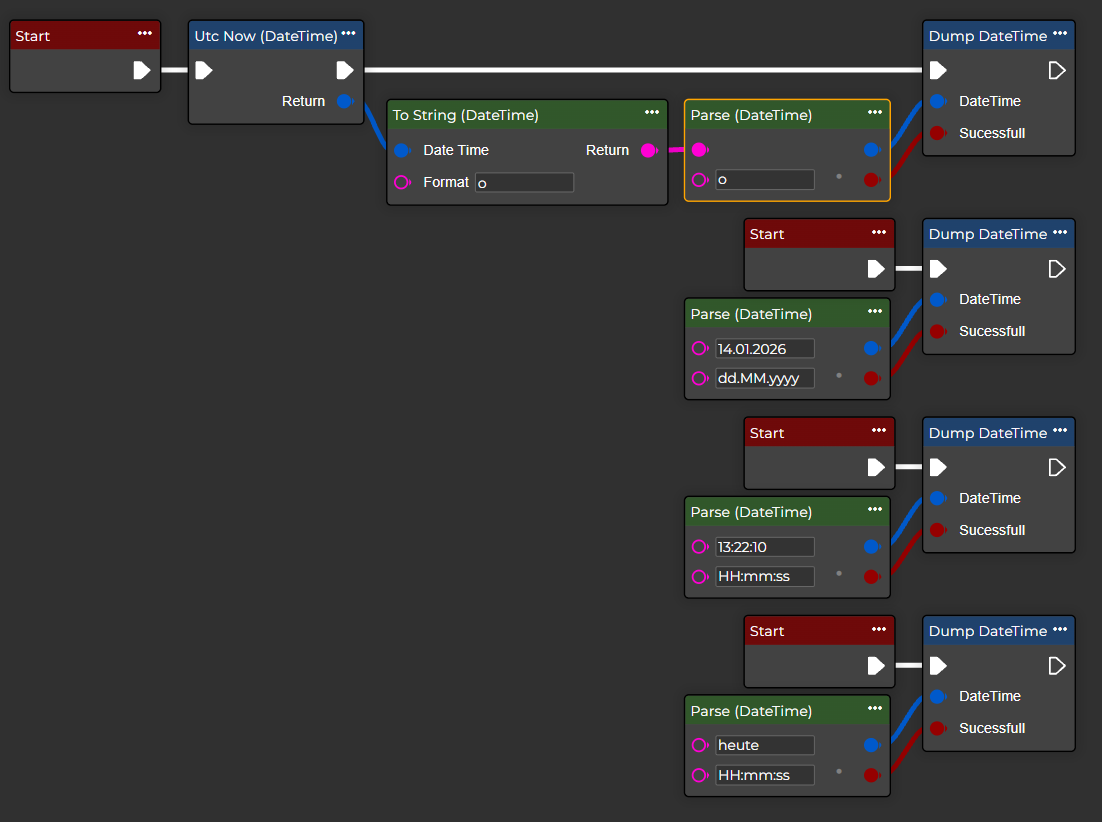
Parse (DateTime)
This node allows you to convert a string into a date/time offset, provided this is possible due to its format.
Flow
Parameter set
|
Parameter |
Type |
Description |
|---|---|---|
|
Text |
String |
This is a text-based date. |
|
Format |
String |
Here you can set the format for displaying the date and time. Use "HH" for the hour in 24-hour format (00–23) or "hh" for the hour in 12-hour format (01–12). When using "hh," "dd" is usually added to indicate AM/PM. Date and time: "yyyy-MM-dd HH:mm:ss", "dd/MM/yyyy HH:mm:ss" or "MMMM dd, yyyy HH:mm:ss" Date only: "yyyy-MM-dd", "dd/MM/yyyy" or "MMMM dd, yyyy" Time only: "HH:mm:ss" or "hh:mm dd" Custom combinations: "yyyy-MM-dd hh:mm dd" or "MMMM dd, yyyy 'at' HH:mm:ss" |