
Read Single 1D/2D Code
This node allows you to read a single 1D/2D code from your image. The following formats are supported:
|
Type |
Use cases |
Benefits |
|---|---|---|
|
Codabar |
|
Simple, very robust code that works well even with old or basic printers. |
|
Code 39 |
|
Can display letters, numbers, and some special characters. Commonly used in industrial applications. |
|
Code 93 |
|
Higher data density and reliability than Code 39; supports the same character set but requires less space. |
|
Code 128 |
|
Very compact, supports the full ASCII set. Ideal for storing a lot of information in a small space. |
|
EAN-8 |
|
Same function as EAN-13, but shorter. Used when there isn't enough space for a large label. |
|
EAN-13 |
|
International standard for consumer goods labeling. Scanned everywhere in stores. |
|
ITF |
|
Good for printing on corrugated cardboard, very resistant to distortion. Encodes only numbers. |
|
MSI |
|
Simple integration, but less standardized. Only encodes numbers. |
|
RSS-14 |
|
Can store more information (e.g., batch or expiration dates) in a smaller space than EAN/UPC. |
|
UPC-A |
|
North American equivalent of the EAN-13 (12 digits). |
|
UPC-E |
|
Very small packages in US retail |
Flow
Our example uses a File Camera component and two String variables to extract the text and format of the code.
For preprocessing, we need the Binary Threshold node. A threshold value, for example, 128, is applied to the input image, converting the pixels to black and white. The result is a region that we can use to extract the code.
Postprocessing requires the Break Code Result node. This structure must be broken down for further processing so that the recognized code content and its format can be extracted.

Parameter set
|
Parameter |
Type |
Description |
|---|---|---|
|
Region |
Region |
Binary image, which can be generated via preprocessing, e.g. via the Binary Threshold node, and is needed for reading codes. |
|
Return |
Code Result |
The value embedded in the code is returned as a code result, which includes "Text" and the "Code format". Use a "Break Code Result" node to access the individual parts of the result. |
Read Data Matrix Code
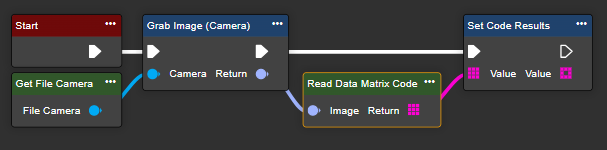
This node allows you to read a Data Matrix code from your image. A Data Matrix code is a two-dimensional code consisting of black and white square modules arranged in a grid pattern.
Flow
Our example uses a File Camera component and a variable of type String array to read the text or results. No pre- or post-processing of the reading operation is necessary.
Parameter set
|
Parameter |
Type |
Description |
|---|---|---|
|
Image |
Image |
The input image, which contains the Data Matrix code. |
|
Return |
String (Array) |
Return value in the form of a string array containing all values embedded in the code. |
Read Text
This node allows you to read text in your image, also known as OCR (optical character recognition).
Flow
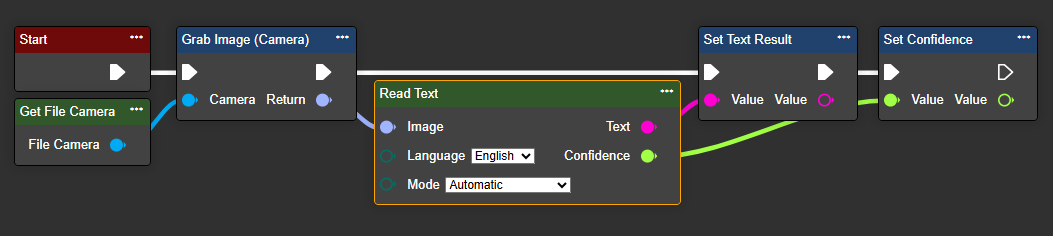
Our example uses a File Camera component, a String variable to read the text, and a Single variable to evaluate the quality of the read operation. No pre- or post-processing of the read operation is necessary.
The Read Text node requires a language and a mode to be specified. Currently, German and English are available. The mode is required to improve accuracy based on the text structure.
Parameter set
|
Parameter |
Type |
Description |
|---|---|---|
|
Image |
Image |
The opening image, which contains the text. |
|
Language |
TextLanguage |
The language in which the text is stored. This node can currently handle German and English. Therefore, valid values are English and German. |
|
Mode |
Mode |
|